
- Many school districts already have panic buttons, PA systems, radios, access control, emergency notification tools, door hardware, and 911 procedures in place. But having the pieces is not the same as having a coordinated lockdown system. If each step depends on someone manually relaying information, the response can become slower, harder to verify, and more vulnerable to gaps.
- In a real emergency, the first few seconds matter. A panic button should not simply alert one person or activate one local device. It should trigger the full response chain: PA announcements, radio alerts, door-control actions, emergency notifications, 911 workflows, and audit logging. Without that coordination, districts may not know exactly what happened, which systems responded, or where the workflow broke down.
- A school lockdown system is not defined by the panic button. It is defined by everything the panic button can reliably trigger, verify, and support. For district operations, public safety, facilities, and security leaders, the next phase of school safety is not buying another isolated tool. It is making the tools already in place act together when seconds matter.
A lockdown drill works because everyone in the building knows what to do. A lockdown system is a different story.
In many school districts, this “system” is actually several separate products, processes, and manual handoffs. A panic button may call security. Security gets on the radio. Someone makes a PA announcement. Someone else dials 911. Door controls may or may not be connected to the workflow.
Each step takes seconds. In a real emergency, those seconds can become the gap between a controlled response and an improvised one.
Many schools already have safety tools in place: panic buttons, PA systems, emergency notification platforms, radios, access control, door hardware, and 911 procedures. But having these components is not the same as having a coordinated school lockdown system. The better question is not simply, “Do we have a lockdown system?” It is, “When the panic button is pressed, what happens in the next eight seconds?”
For district operations, public safety, facilities, and security leaders, the next phase of school safety is not buying another isolated tool. It is making the tools already in place act together.
What “School Lockdown System” Actually Means in 2026
The phrase “school lockdown system” can mean very different things depending on the district.
For one school, it may mean a panic button wired to a local bell. For another, it may mean a wall-mounted button connected to a third-party voice announcement system. In some districts, it may mean a custom workflow created by a former IT staff member or contractor. In more mature environments, it may mean a fully coordinated workflow that triggers communications, door controls, 911 notifications, and audit logging in response to a single event.
That difference matters. A district may say it has a lockdown system when, in practice, it relies on several disconnected safety products that depend on people to relay information among them.
The first step in evaluating a school lockdown system is naming what you actually have.
An internally built script may work well at first, but it can become hard to maintain when staff leave, APIs change, firmware updates occur, or vendors change their products. A bell-only or local alert can notify people nearby but may not trigger communications, 911 calls, or access-control actions. A vendor stack may include several strong tools, but if each product handles only one piece of the response, the district may still lack a coordinated workflow.
A truly synchronized workflow is different. It allows one trigger to activate multiple systems at once, with clear logic, support, logging, and repeatability.
A school lockdown system is not defined by the panic button. It is defined by everything the panic button can reliably trigger.
The Five Things That Should Happen in the First Eight Seconds
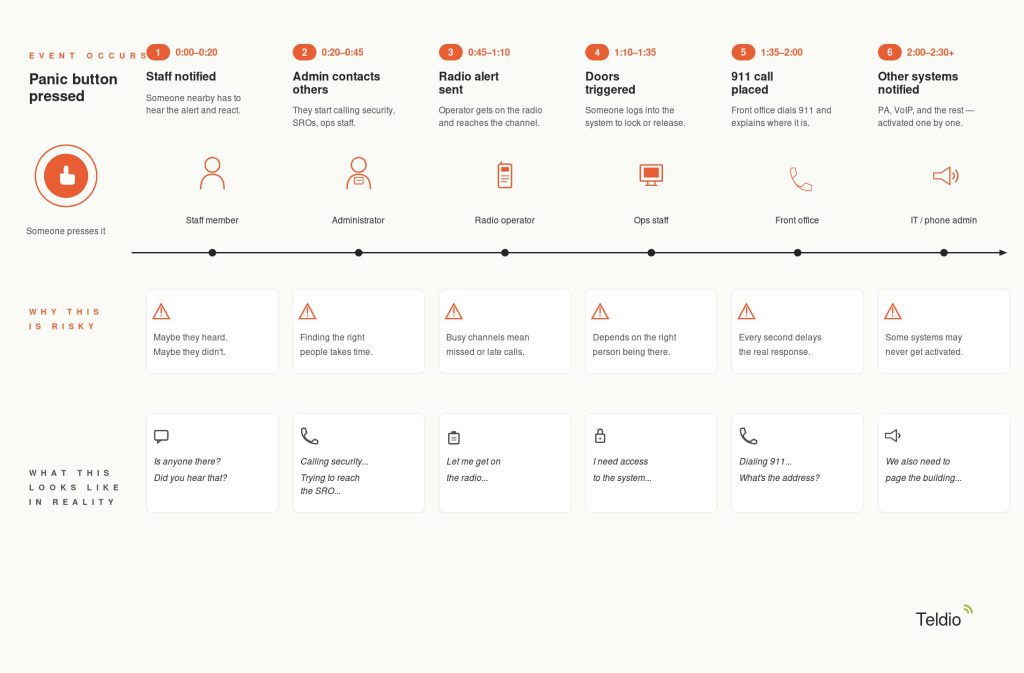 A defensible lockdown response should not depend on staff manually relaying instructions between systems under pressure. A single panic event should trigger multiple actions concurrently, with each system performing its role in the response chain.
The first action is often a PA system announcement. The building needs an immediate, clear message. Where possible, districts may prefer pre-recorded announcements to reduce hesitation and ensure consistent instructions across schools, buildings, or scenarios.
The second is a radio alert to staff and school resource officers. Security teams, administrators, operations staff, and SROs may need audible alerts, text alerts, or talk-group-specific notifications through the radio systems they already use.
The third is door control or magnetic door release. Depending on the district’s policy and hardware configuration, the workflow may need to trigger door release, lockdown, or access control actions in coordination with existing building procedures.
The fourth is 911 dial-out. Emergency services may need to receive a call with the location and a recorded message. This step should be carefully designed to incorporate site-specific information and redundancy.
The fifth is InformaCast, Cisco phone, or VoIP-based announcement support. For districts using VoIP phones, emergency announcements can be broadcast through phone speakers and related communications infrastructure, providing districts with another channel for rapid, building-wide communication.
In a coordinated workflow, the logic looks like this:
If a wall-mounted panic button is pressed, and the system is in operational mode, then the PA system announces the lockdown, radios deliver an audible and text alert to the security talk group, door-control actions are triggered, the emergency notification workflow activates, 911 is called, and the audit log captures each step with timestamps.
A district that coordinates these actions around a single trigger reduces the response window from “how fast can staff relay the message?” to “how fast can the system carry the event?”
Why 911 Redundancy Is the Part Nobody Talks About
Many emergency workflows rely on modern voice infrastructure, whether that means VoIP, SIP trunks, managed carrier services, or district phone systems. Those systems may work during normal conditions, but emergency procedures still need to account for what happens when part of the calling path is unavailable.
This is where terminology matters. A district may believe it has a redundant 911 path because the service uses existing copper infrastructure, a managed voice circuit, or a separate phone system. But the real question is not what the connection looks like; it is what the 911 workflow depends on to complete the call.
Districts should confirm the actual service path with their provider. They should understand whether 911 dial-out depends on the district network, a VOIP server, a SIP trunk, a carrier-managed circuit, or some combination of those components. They should also know where any analog-to-SIP gateway sits in the architecture, how emergency calls are prioritized, and whether routine notifications could ever block or delay the emergency path.
For lockdown workflows, redundancy means having a clearly defined backup path for emergency calling, rather than simply assuming the phone system will behave the same way during an outage as it does in normal operation.
If the 911 path relies entirely on one dependency, the district lacks true redundancy. It has a single point of failure in the emergency call chain.
The Homemade System Trap
Many districts create improvised systems because they need something that works quickly. A skilled staff member may build a script. A contractor may wire together a temporary workflow. A vendor may connect one system to another for a specific use case.
These setups can work for a while. The problem usually appears later.
The person who built the workflow leaves. A vendor changes an API. Radio firmware updates. The access control system changes. A workflow built for one school gets stretched across an entire district. The failure mode is not always dramatic. Pieces can stop working quietly, and nobody notices until a drill or incident exposes the gap.
That is the homemade system trap. The system may save money on day one, but cost operational confidence on day one thousand.
Support is not just a phone number. It means someone understands the architecture, the connected systems, the vendor relationships, the firmware dependencies, and the district’s response expectations.
A district may be able to keep parts of its existing system if they are stable, documented, and supported. Migration becomes more urgent when the workflow cannot be audited or maintained, depends on a single person, or cannot reliably coordinate multiple systems.
What the Integration Layer Actually Does
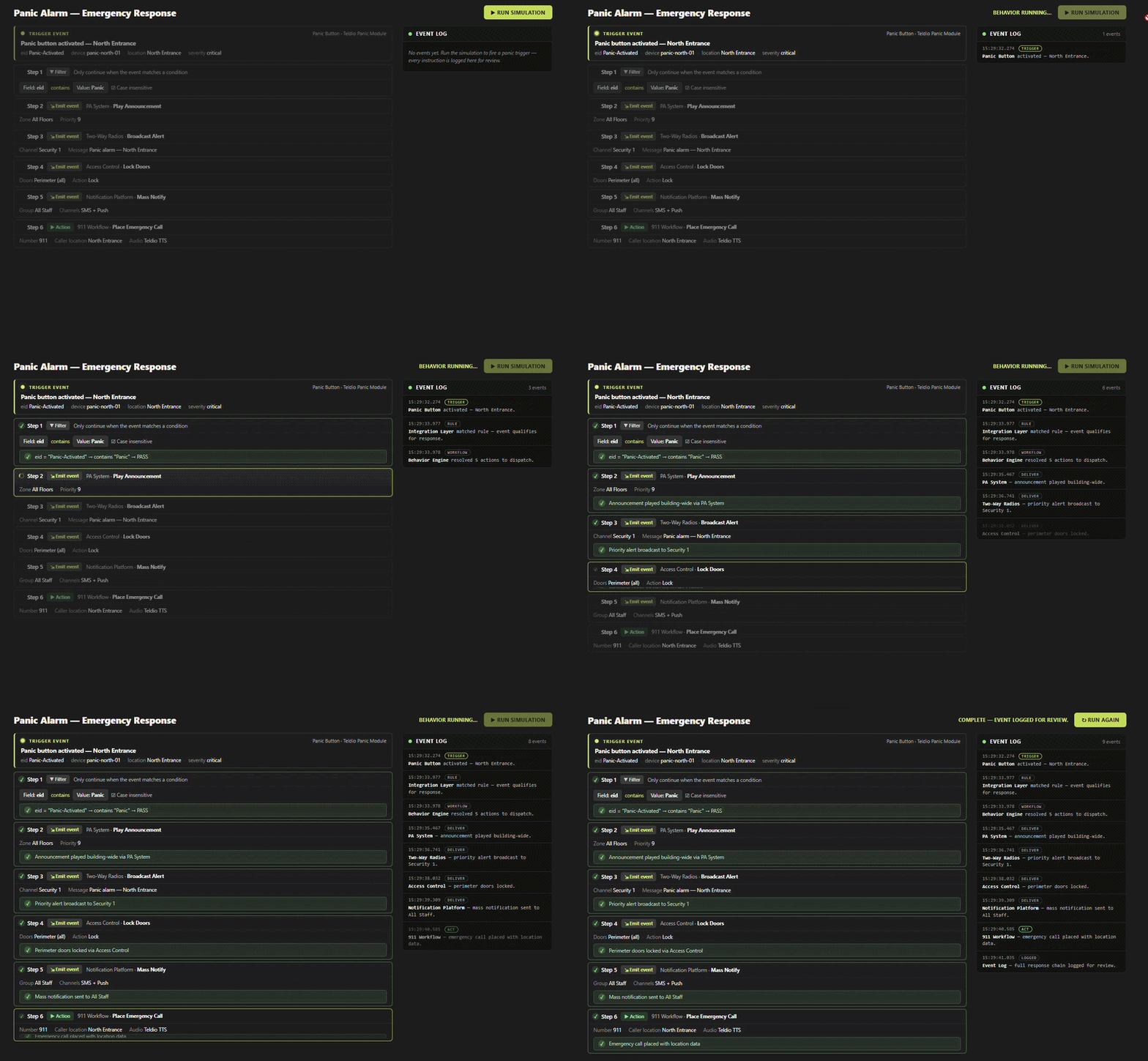 An integration layer does not replace every system the district already owns. It connects them.
It ingests events from one system, applies rules, and triggers actions in others. In a school lockdown workflow, that may mean connecting panic buttons, PA systems, radios, access control, emergency notification platforms, 911 workflows, and visual dashboards into a single response chain.
In practical terms, a panic trigger comes in. The integration layer checks the rule. The workflow determines what should happen. Each connected system receives the right instruction. The event is logged for review.
This is where Teldio Fabric fits into the conversation. Teldio Fabric helps districts connect existing safety, communications, and security systems so they can act together during high-pressure events. The goal is not to force a district to rip and replace every tool. The goal is to help the systems already in place behave as a single coordinated system.
Deployment can vary by district. Some environments may prefer on-premise architecture for local survivability. Others may prefer virtual machine deployments that fit existing IT infrastructure. Cloud or managed environments may be appropriate depending on district policy, network design, and support needs.
The integration layer is what turns the systems a district already owns into a single system.
A Worked Example: A Four-School District
A four-school district does not need four unrelated lockdown systems. It needs one district-wide response model with site-level resilience.
In a typical coordinated deployment, each school may have a standardized hardware package, so installation, maintenance, and support are consistent across the district. Each site may need enough local autonomy to operate if connectivity to a central district view is interrupted. At the same time, district leaders may still need a central reporting view for monitoring, review, and support.
The radio side may include emergency-button programming, staff and security talk groups, and alerts for school resource officers. The panic-button side may include wireless buttons, mesh coverage planning, range expectations, and battery-life considerations. Door and access control actions may be handled through panels, contact closures, gateways, or supported APIs, depending on the district’s existing infrastructure.
The point is not that every district needs the exact same architecture. The point is that every district needs a repeatable one.
A four-school deployment should not become four separate emergency procedures. It should become one coordinated district workflow with local resilience at each site.
Questions to Ask Any Vendor Before You Sign
The best vendor conversations do not hide behind product names. They clarify the workflow.
Before choosing a school lockdown system, districts should ask:
- Does your system call 911 over the internet, an analog line, or both?
- A strong answer should explain redundancy, failover, and how the system behaves if internet connectivity is lost.
- If our access control vendor changes its API next year, what breaks?
- Look for a clear explanation of how the integration layer handles vendor changes, software updates, and ongoing support.
- Can you produce a complete event log of a lockdown drill?
- The vendor should be able to show every system action, timestamp, and result without requiring manual reconstruction.
- What happens if the on-site server or gateway fails?
- There should be a named redundancy, recovery, or fallback plan.
- Who do we call at 2 a.m. if something breaks?
- The answer should identify support ownership, escalation paths, and response-time expectations.
- How does this work across all district sites?
- The vendor should explain whether the district receives a single coordinated view, site-level autonomy, or both.
These questions expose whether the district is buying another standalone product or building a coordinated response workflow.
Why This Matters Beyond K-12
 The school district use case is the clearest expression of the problem, but emergency coordination is not limited to K-12.
Higher education campuses may need to coordinate campus alerts, access control, security radios, PA systems, and dispatch. Healthcare facilities may need to connect staff duress, access control, nurse call, overhead paging, and security response. Manufacturing sites may need emergency stops, radio alerts, PA announcements, access control, and incident escalation.
The vertical changes, but the operational problem stays the same: one event, many required actions, and no time for manual handoffs.
Emergency coordination is not a school-only problem. Schools simply make the cost of disconnected response impossible to ignore.
The Buyer’s Question That Matters
The right question is not, “Do we have a lockdown system?”
The right question is: “If a panic button were pressed in any building right now, can I describe exactly what would happen in the next eight seconds, and can I prove it afterward?”
If the answer is “maybe,” that is the work.
Most districts discover a gap between having safety products and having an coordinated response. Closing that gap is operational work, not just a product purchase.
A school lockdown system is only as strong as the response chain it can trigger, verify, and support.
Talk to Teldio About School Lockdown Coordination
Teldio helps school districts connect panic triggers, PA systems, radios, emergency notification platforms, 911 workflows, access control, and audit logging into coordinated emergency response workflows.
If your district already has the pieces, Teldio can help make them work together when seconds matter. Contact Teldio to connect your school lockdown systems into a coordinated emergency response workflow.